Low cost IT training in St Albans & Harpenden areas

Book today: 01727 617359 or email courses@cfsta.org
© Copyright 2021 Computer Friendly
Registered in England number 04398683 Registered Charity number 1096433

Computer Friendly
Our Courses
Getting started with computers and the Internet?
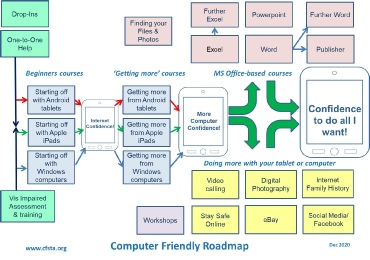
If you are new to computers and want to see how easy it is to start then consider our short A Taste of the Internet session to show you what computers and tablets look and feel like, so you can work out what the best approach is for you. Click here for :
If you then decide to buy a tablet or laptop you can get started with confidence using our ‘Starting off with’ courses. Click here for details:
Drop-
If you already have a computer we suggest you pick your course from our Getting more courses. see below for more details.
Fancy a new hobby or interest?
- Learn Digital Photography skills to improve, edit and share your pictures with your friends electronically
- Trace your Family History with our Introduction to Family History on the Internet course
- Start decluttering items in your house and sell them using our Buying and Selling on eBay course
- Get onto Facebook, Twitter and Pinterest, Instagram on our Social Media course
Want to get more from your computer or tablet?
If you have experience of the Internet and email already, and are adding a tablet or iPad to your computing, then choose which one of our ‘Getting More’ courses to go on.
To get more experience with a laptop then try our
- Getting More from Windows course.
- Organise your files and folders on your computer with our Finding Your Files and Photos
Refresh your business skills with our Windows Office courses:
- Writing letters, articles with MS Word and Further Word, or use Publisher for newsletters, posters etc
- Prepare presentations and slide shows using PowerPoint
- Learn MS Excel to crunch some numbers and do your accounts and Further Excel to improve your spreadsheet skills.
- Get more from your computer by making free video and telephone calls with Skype, or checking your security with our Stay Safe Online course.
Phone today to book your course
01727 617359
Mondays, Wednesdays and Fridays
from 10:00am to 1:00pm only.
You can leave a message at other times and one of the team will get back to you.
Or email Courses@cfsta.org
Check out where and when we run our courses
Most Computer Friendly courses are run in various venues in both St Albans and Harpenden, with occasional outreach courses in in other locations.
Click Venues for where to go.
Workshops
Come to one of our Introductory Workshops to learn different ways of using the Internet, or to one of our Hands-
Low Prices
Our Beginners courses are only £10 to cover the printing and administration costs.
Other courses are £24, £32, £40 or £48 depending upon length.